 Danny McGee
06751e54f6
Danny McGee
06751e54f6
This PR implements basic object selection, with help from `bevy_mod_picking` and
`bevy_mod_outline`.

### Work Done
 * Click to select objects in the world
 * Selected objects become visually highlighted
 * The selected entity is available globally on the `Res<Selection>` resource
 * Selected entities can also be queried via the `Selected` marker component
 * Pressing `F` will "focus" the camera on the selected entity
 * Pressing `Esc` will clear the active selection

### Known Issues
 * We're currently using `bevy_mod_picking`'s "Selection" feature, which isn't
   aware of our own input events. As a consequence, it will select the object
   under the cursor when releasing `LMB` after orbiting the camera, which is not
   what we want. This should be pretty easily fixable by dropping
   `bevy_mod_picking`'s selection feature and reading the object under the
   cursor in our own click listener that only runs if the LMB event is
   unhandled.
 * The skinned mesh is not currently selectable. This is likely fixable by
   adjusting the logic in `scene::mark_scene_objects`... somehow. The `Gltf`
   data structure is kind of a nightmare to work with, so this will take some
   investigation.

### Future Enhancements
 * For parity with other DCC apps, the "Focus" action should also adjust the
   camera zoom level to "frame" the selected object in the view. Punting on that
   for now because I'm not super confident about the math involved.
 * Group selection with Shift/Ctrl and/or marquee selection would be really nice
   to have, but probably not critical for now.
Note
: This is a temporary fork of bevy_mod_outline to fix this issue.
This can be removed and replaced with the crates.io import once the issue is fixed upstream.
bevy_mod_outline


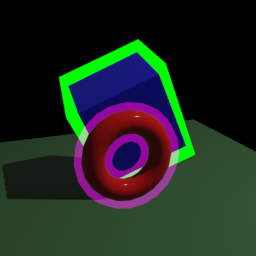
This crate provides a Bevy plugin for drawing outlines around meshes using the vertex extrusion method.
Dependency
[dependencies]
bevy_mod_outline = "0.5"
Examples
A rotating cube and torus with opaque and transparent outlines.
cargo run --example shapes
Multiple intersecting meshes sharing an outline plane. The outline stencil is offset to create a gap between the object and its outline.
cargo run --example pieces
Many instances of the same mesh, with two different outline configurations, flying towards the camera.
cargo run --example flying_objects
An outlined torus viewed through four cameras with different combinations of render layers enabled.
cargo run --example render_layers
An animated jointed glTF model with an outline.
cargo run --example animated_fox
A glTF model with pre-baked outline normals.
cargo run --example hollow
An animated morphing glTF model with an outline.
cargo run --example morph_targets
Versions
| This Version | Bevy version |
|---|---|
| 0.5.x | 0.11.x |
| 0.4.x | 0.10.x |
| 0.3.x | 0.9.x |
| 0.2.x | 0.8.x |
| 0.1.x | 0.7.x |
Features
bevy_ui(default) - Adds a render graph edge to prevent clashing with the UI. This adds a dependency on thebevy_uicrate and can be disabled if it is not used.
Licence
This crate is licensed under the Apache License, Version 2.0 (see LICENCE-APACHE or http://www.apache.org/licenses/LICENSE-2.0) or the MIT licence (see LICENCE-MIT or http://opensource.org/licenses/MIT), at your option.
Unless you explicitly state otherwise, any contribution intentionally submitted for inclusion in the work by you, as defined in the Apache-2.0 license, shall be dual licensed as above, without any additional terms or conditions.