A fork of [`so-vits-svc`](https://github.com/svc-develop-team/so-vits-svc) with **realtime support** and **greatly improved interface**. Based on branch `4.0` (v1) and the models are compatible.
## Features not available in the original repo
- **Realtime voice conversion** (enhanced in v1.1.0)
- Integrates [`QuickVC`](https://github.com/quickvc/QuickVC-VoiceConversion)
- Fixed misuse of [`ContentVec`](https://github.com/auspicious3000/contentvec) in the original repository.[^c]
- More accurate pitch estimation using [`CREPE`](https://github.com/marl/crepe/).
- GUI and unified CLI available
- ~2x faster training
- Ready to use just by installing with `pip`.
- Automatically download pretrained models. No need to install `fairseq`.
- Code completely formatted with black, isort, autoflake etc.
[^c]: [#206](https://github.com/34j/so-vits-svc-fork/issues/206)
## Installation
### One click easy installation
### Manual installation
Creating a virtual environment
Windows:
```shell
py -3.10 -m venv venv
venv\Scripts\activate
```
Linux/MacOS:
```shell
python3.10 -m venv venv
source venv/bin/activate
```
Anaconda:
```shell
conda create -n so-vits-svc-fork python=3.10 pip
conda activate so-vits-svc-fork
```
Installing without creating a virtual environment may cause a `PermissionError` if Python is installed in Program Files, etc.
Install this via pip (or your favourite package manager that uses pip):
```shell
python -m pip install -U pip setuptools wheel
pip install -U torch torchaudio --index-url https://download.pytorch.org/whl/cu118
pip install -U so-vits-svc-fork
```
Notes
- If no GPU is available or using MacOS, simply remove `pip install -U torch torchaudio --index-url https://download.pytorch.org/whl/cu118`. MPS is probably supported.
- If you are using an AMD GPU on Linux, replace `--index-url https://download.pytorch.org/whl/cu118` with `--index-url https://download.pytorch.org/whl/rocm5.4.2`. AMD GPUs are not supported on Windows ([#120](https://github.com/34j/so-vits-svc-fork/issues/120)).
### Update
Please update this package regularly to get the latest features and bug fixes.
```shell
pip install -U so-vits-svc-fork
```
## Usage
### Inference
#### GUI
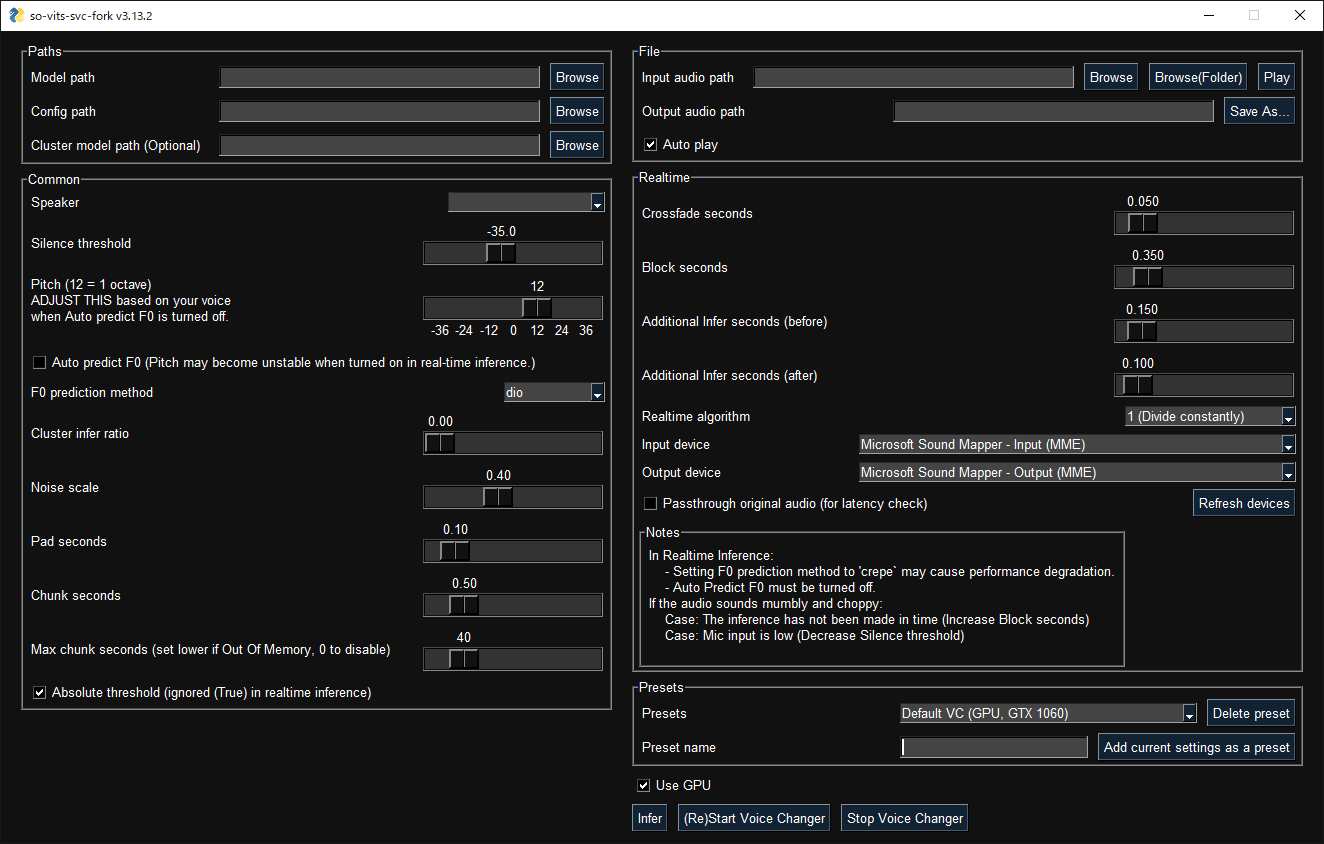
GUI launches with the following command:
```shell
svcg
```
#### CLI
- Realtime (from microphone)
```shell
svc vc
```
- File
```shell
svc infer source.wav
```
[Pretrained models](https://huggingface.co/models?search=so-vits-svc-4.0) are available on Hugging Face.
#### Notes
- If using WSL, please note that WSL requires additional setup to handle audio and the GUI will not work without finding an audio device.
- In real-time inference, if there is noise on the inputs, the HuBERT model will react to those as well. Consider using realtime noise reduction applications such as [RTX Voice](https://www.nvidia.com/en-us/geforce/guides/nvidia-rtx-voice-setup-guide/) in this case.
### Training
#### Before training
- If your dataset has BGM, please remove the BGM using software such as [Ultimate Vocal Remover](https://ultimatevocalremover.com/). `3_HP-Vocal-UVR.pth` or `UVR-MDX-NET Main` is recommended. [^1]
- If your dataset is a long audio file with a single speaker, use `svc pre-split` to split the dataset into multiple files (using `librosa`).
- If your dataset is a long audio file with multiple speakers, use `svc pre-sd` to split the dataset into multiple files (using `pyannote.audio`). Further manual classification may be necessary due to accuracy issues. If speakers speak with a variety of speech styles, set --min-speakers larger than the actual number of speakers. Due to unresolved dependencies, please install `pyannote.audio` manually: `pip install pyannote-audio`.
- To manually classify audio files, `svc pre-classify` is available. Up and down arrow keys can be used to change the playback speed.
[^1]: https://ytpmv.info/how-to-use-uvr/
#### Cloud
[](https://colab.research.google.com/github/34j/so-vits-svc-fork/blob/main/notebooks/so-vits-svc-fork-4.0.ipynb)
[](https://console.paperspace.com/github/34j/so-vits-svc-fork-paperspace/blob/main/so-vits-svc-fork-4.0-paperspace.ipynb)
[![Paperspace Referral]()](https://www.paperspace.com/?r=9VJN74I)[^p]
If you do not have access to a GPU with more than 10 GB of VRAM, the free plan of Google Colab is recommended for light users and the Pro/Growth plan of Paperspace is recommended for heavy users. Conversely, if you have access to a high-end GPU, the use of cloud services is not recommended.
[^p]: If you register a referral code and then add a payment method, you may save about $5 on your first month's monthly billing. Note that both referral rewards are Paperspace credits and not cash. It was a tough decision but inserted because debugging and training the initial model requires a large amount of computing power and the developer is a student.
#### Local
Place your dataset like `dataset_raw/{speaker_id}/**/{wav_file}.{any_format}` (subfolders and non-ASCII filenames are acceptable) and run:
```shell
svc pre-resample
svc pre-config
svc pre-hubert
svc train -t
```
#### Notes
- Dataset audio duration per file should be <~ 10s.
- It is recommended to increase the `batch_size` as much as possible in `config.json` before the `train` command to match the VRAM capacity. Setting `batch_size` to `auto-{init_batch_size}-{max_n_trials}` (or simply `auto`) will automatically increase `batch_size` until OOM error occurs, but may not be useful in some cases.
- To use `CREPE`, replace `svc pre-hubert` with `svc pre-hubert -fm crepe`.
- To use `ContentVec` correctly, replace `svc pre-config` with `-t so-vits-svc-4.0v1`. Training may take slightly longer because some weights are reset due to reusing legacy initial generator weights.
- To use `MS-iSTFT Decoder`, replace `svc pre-config` with `svc pre-config -t quickvc`.
- Silence removal and volume normalization are automatically performed (as in the upstream repo) and are not required.
- If you have trained on a large, copyright-free dataset, consider releasing it as an initial model.
- For further details (e.g. parameters, etc.), you can see the [Wiki](https://github.com/34j/so-vits-svc-fork/wiki) or [Discussions](https://github.com/34j/so-vits-svc-fork/discussions).
### Further help
For more details, run `svc -h` or `svc -h`.
```shell
> svc -h
Usage: svc [OPTIONS] COMMAND [ARGS]...
so-vits-svc allows any folder structure for training data.
However, the following folder structure is recommended.
When training: dataset_raw/{speaker_name}/**/{wav_name}.{any_format}
When inference: configs/44k/config.json, logs/44k/G_XXXX.pth
If the folder structure is followed, you DO NOT NEED TO SPECIFY model path, config path, etc.
(The latest model will be automatically loaded.)
To train a model, run pre-resample, pre-config, pre-hubert, train.
To infer a model, run infer.
Options:
-h, --help Show this message and exit.
Commands:
clean Clean up files, only useful if you are using the default file structure
infer Inference
onnx Export model to onnx (currently not working)
pre-classify Classify multiple audio files into multiple files
pre-config Preprocessing part 2: config
pre-hubert Preprocessing part 3: hubert If the HuBERT model is not found, it will be...
pre-resample Preprocessing part 1: resample
pre-sd Speech diarization using pyannote.audio
pre-split Split audio files into multiple files
train Train model If D_0.pth or G_0.pth not found, automatically download from hub.
train-cluster Train k-means clustering
vc Realtime inference from microphone
```
#### External Links
[Video Tutorial](https://www.youtube.com/watch?v=tZn0lcGO5OQ)
## Contributors ✨
Thanks goes to these wonderful people ([emoji key](https://allcontributors.org/docs/en/emoji-key)):









 ### Manual installation


