A fork of [`so-vits-svc`](https://github.com/svc-develop-team/so-vits-svc) with **realtime support** and **greatly improved interface**. Based on branch `4.0` (v1) and the models are compatible.
## Installation
Install this via pip (or your favourite package manager):
```shell
pip install -U torch torchaudio --index-url https://download.pytorch.org/whl/cu117
pip install so-vits-svc-fork
```
## Features not available in the original repo
- **Realtime voice conversion** (enhanced in v1.1.0)
- More accurate pitch estimation using CREPE
- GUI available
- Unified command-line interface (no need to run Python scripts)
- Ready to use just by installing with `pip`.
- Automatically download pretrained base model and HuBERT model
- Code completely formatted with black, isort, autoflake etc.
- Volume normalization in preprocessing
- Other minor differences
## Usage
### Inference
#### GUI
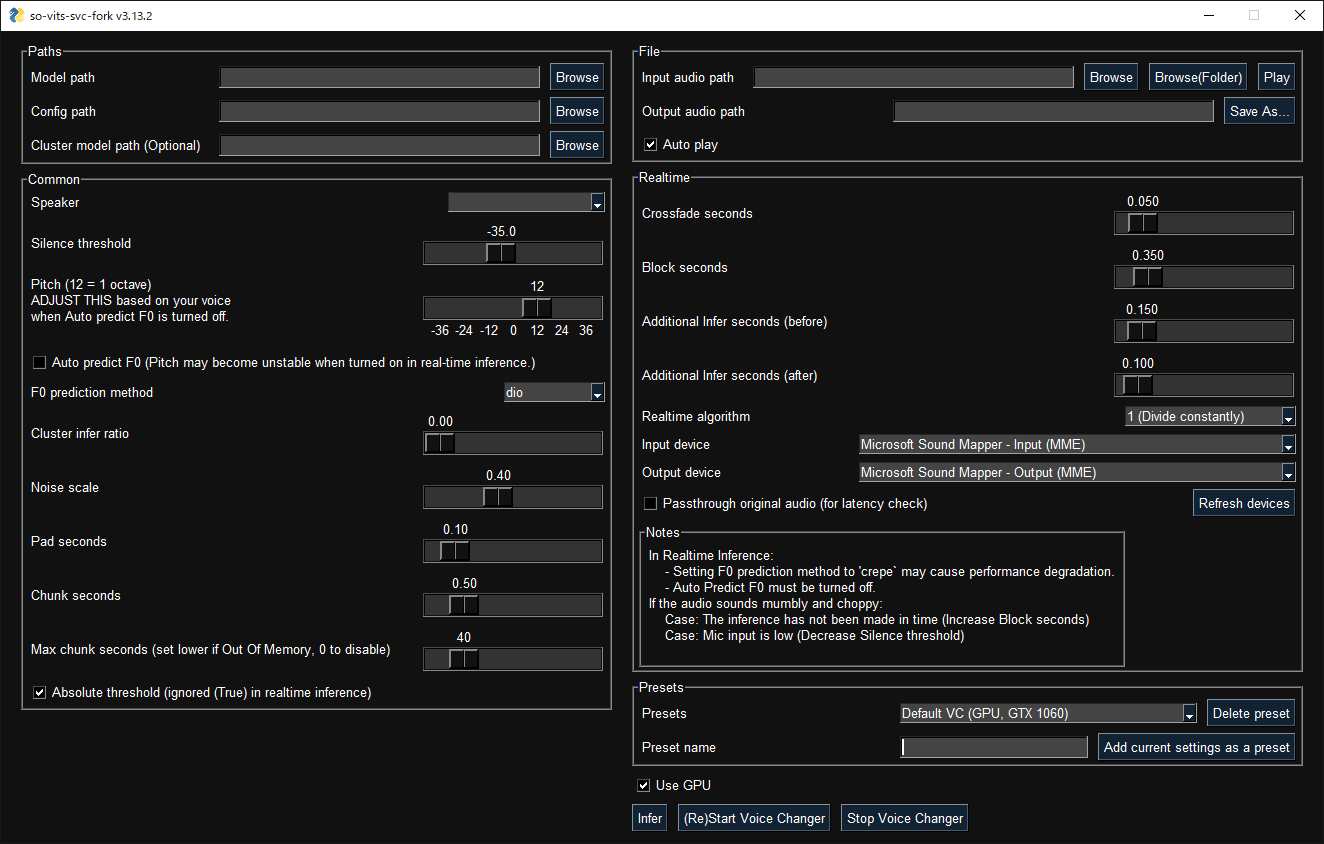
GUI launches with the following command:
```shell
svcg
```
#### CLI
- Realtime (from microphone)
```shell
svc vc --model-path
```
- File
```shell
svc --model-path source.wav
```
#### Notes
- In real-time inference, if there is noise on the inputs, the HuBERT model will react to those as well. Consider using realtime noise reduction applications such as [RTX Voice](https://www.nvidia.com/en-us/geforce/guides/nvidia-rtx-voice-setup-guide/) in this case.
### Training
#### Google Colab
[](https://colab.research.google.com/github/34j/so-vits-svc-fork/blob/main/notebooks/so-vits-svc-fork-4.0.ipynb)
#### Local
Place your dataset like `dataset_raw/{speaker_id}/**/{wav_file}.{any_format}` (subfolders are acceptable) and run:
```shell
svc pre-resample
svc pre-config
svc pre-hubert
svc train
```
#### Notes
- Dataset audio duration per file should be <~ 10s or VRAM will run out.
- It is recommended to change the batch_size in `config.json` before the `train` command to match the VRAM capacity. As tested, the default requires about 14 GB.
### Further help
For more details, run `svc -h` or `svc -h`.
```shell
> svc -h
Usage: svc [OPTIONS] COMMAND [ARGS]...
so-vits-svc allows any folder structure for training data.
However, the following folder structure is recommended.
When training: dataset_raw/{speaker_name}/{wav_name}.wav
When inference: configs/44k/config.json, logs/44k/G_XXXX.pth
If the folder structure is followed, you DO NOT NEED TO SPECIFY model path, config path, etc.
(The latest model will be automatically loaded.)
To train a model, run pre-resample, pre-config, pre-hubert, train.
To infer a model, run infer.
Options:
-h, --help Show this message and exit.
Commands:
clean Clean up files, only useful if you are using the default file structure
infer Inference
onnx Export model to onnx
pre-config Preprocessing part 2: config
pre-hubert Preprocessing part 3: hubert If the HuBERT model is not found, it will be...
pre-resample Preprocessing part 1: resample
train Train model If D_0.pth or G_0.pth not found, automatically download from hub.
train-cluster Train k-means clustering
vc Realtime inference from microphone
```
## Contributors ✨
Thanks goes to these wonderful people ([emoji key](https://allcontributors.org/docs/en/emoji-key)):










